This is Part 3 of my “Running a Blog from Telegram” series. If you missed the earlier parts: Part 1 covered building the bot and publishing my first post. Part 2 covered the feedback disaster — how the bot started auto-publishing garbage, and how I fixed it with a draft review flow and scheduling buttons.
By the end of Part 2, the system worked beautifully. Type a message in Telegram, Claude writes a draft, I review it, give feedback, revise, then schedule it for publishing. The whole loop runs from my phone.
But there was still one problem I couldn’t automate away: “What should I write about today?”
The Blank Chat Problem
I’d open Telegram, stare at the chat with my bot, and… nothing. Some days I had ideas. Some days I didn’t. And when I did write something, I had no idea if anyone was actually searching for it.
That’s a real problem when you’re trying to grow a blog with AdSense. It doesn’t matter how good your writing is if nobody’s looking for the topic. I needed a way to write about things people were already searching for — and I needed that information right inside my Telegram workflow.
So the idea was simple: What if the bot could tell ME what to write about?
Not random suggestions. Not AI-generated brainstorming. But topics based on what people in the US are actually searching for right now, connected to this blog’s niche.
First Attempt: pytrends (and Why It Failed)
My first instinct was to use pytrends, a popular Python library that wraps Google Trends. It seemed perfect — install it, call a function, get trending data. Easy.
Except it returned a 404 error.
After some digging, I found out Google had changed their internal API endpoints, and pytrends hadn’t caught up yet. The library was effectively broken. Classic dependency hell — you build on someone else’s wrapper, and when the upstream service changes, you’re stuck waiting for a maintainer to fix it.
This is one of those lessons that keeps repeating itself in software: the fewer dependencies between you and the data source, the better.
The Fix: Google Trends RSS Feed
Instead of relying on a third-party library, I went straight to the source. Google Trends has a public RSS feed:
https://trends.google.com/trending/rss?geo=US
It’s just XML. No API key needed. No library to install. No authentication. Just fetch the URL, parse the XML, and you have real-time trending search terms with traffic estimates.
The beauty of this approach: Google isn’t going to break their own RSS feed without warning. And even if the format changes slightly, XML parsing is simple enough to fix in minutes. No more waiting for a library maintainer to push an update.
How the /trending Command Works
Here’s the flow I built. I type /trending (트렌딩) in Telegram, and the bot goes to work.
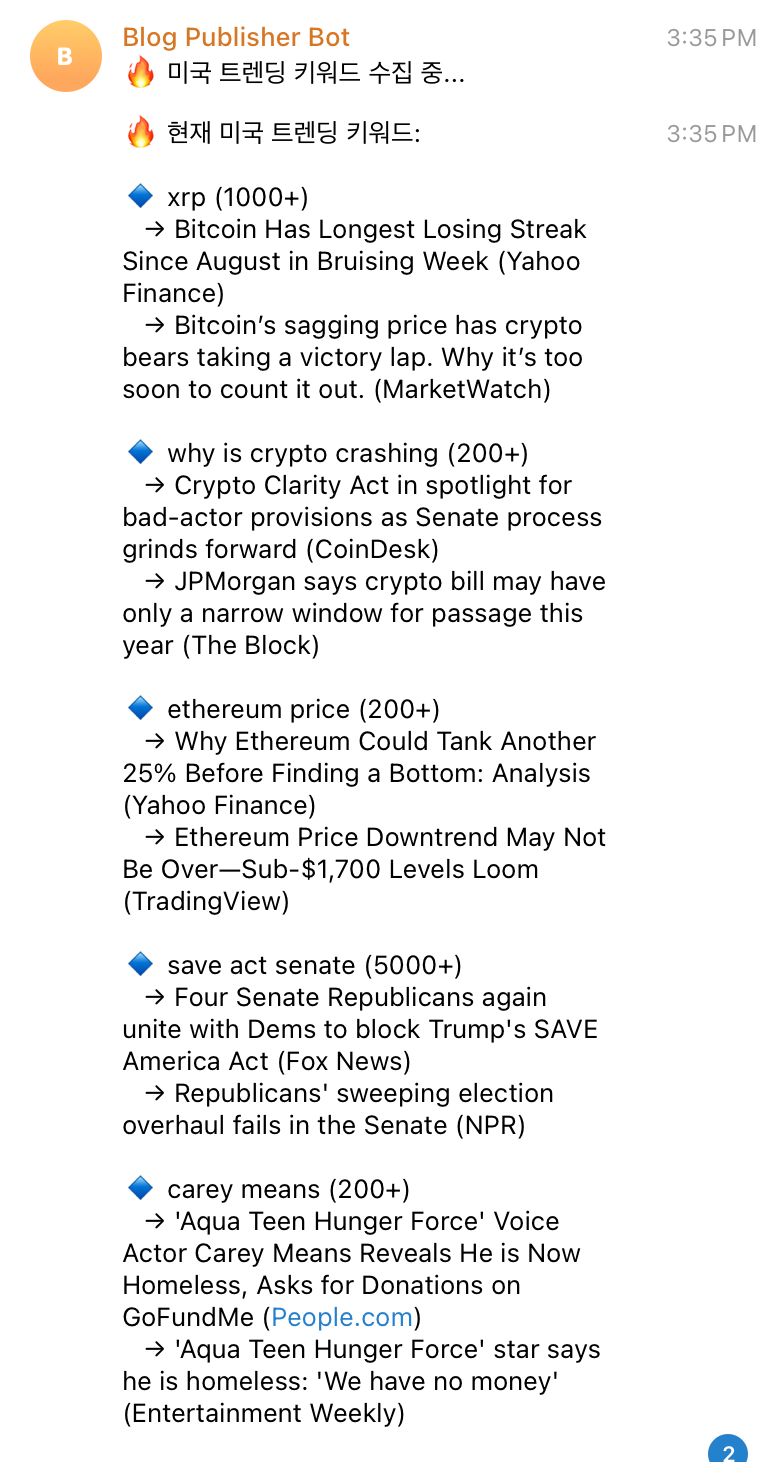
First, it fetches the Google Trends RSS feed for the US market and displays the trending keywords. Each one comes with estimated search traffic and — this is the part I love — Korean explanations of why each keyword is trending. Claude reads the news context and translates it, so I understand what’s happening in the US without leaving Telegram or switching to an English news site.
Then Claude analyzes all those keywords and suggests 5 blog topics that connect the trending searches to my blog’s niche categories: Vibe Coding, Blog Building, Side Hustle, AI & Tech, and Korea & Current Events. These aren’t random — they’re specifically crafted to be relevant to what this blog covers while riding the search wave of what people are looking for right now.
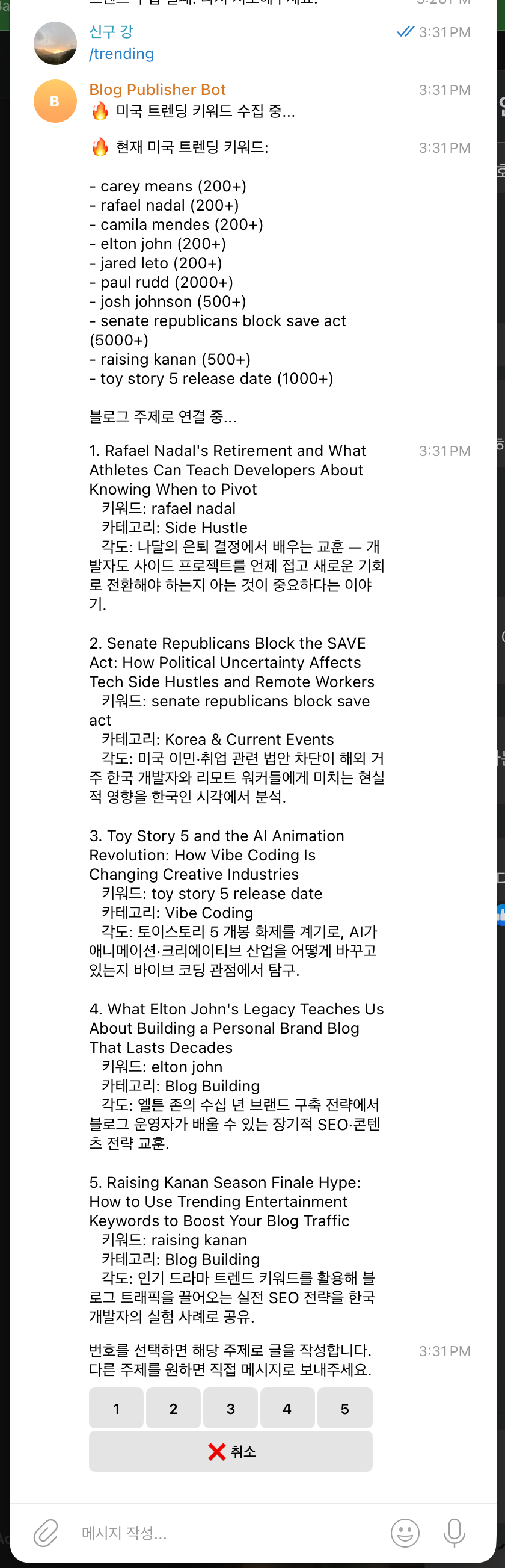
Each suggestion is numbered, and the bot shows inline buttons: [1] [2] [3] [4] [5] [취소]. Tap a number, and the bot starts writing that post immediately. The 취소 (cancel) button lets me back out if none of the suggestions feel right.
From there, it flows right into the system I built in Part 2 — draft review, feedback, revision, and scheduled publishing. The entire pipeline from “what’s trending?” to “post scheduled for Sunday morning” happens without leaving Telegram.
Why This Is an SEO Strategy, Not Just a Feature
Let me be honest about why I built this. It’s not just about convenience — it’s about money.
When you’re running a blog with AdSense, your revenue depends on two things: traffic and CPC (cost per click). Writing about trending topics helps with both:
- Trending topics = riding the search wave. When millions of people are searching for something, even a small slice of that traffic is significant.
- Google Trends data = free real-time keyword research. Tools like Ahrefs and SEMrush charge $99+/month for keyword data. Google Trends RSS gives you real-time search interest for free.
- High-traffic keywords often mean higher CPC. Advertisers pay more for competitive keywords, which means more AdSense revenue per click.
I recently published three posts specifically targeting high-CPC topics — AI tools comparison, Claude vs ChatGPT breakdown, and VPS hosting guide — based on exactly this kind of keyword research. The /trending command just automates the process I was already doing manually.
The key insight: you never run out of content ideas when you’re looking at what the world is searching for. And when those ideas are filtered through your blog’s niche, every suggestion is both timely and relevant.
The Bot Evolution: From Tool to Content Partner
Looking back at these three posts, what strikes me is how the bot’s role has changed:
- Part 1: Send message → get blog post. Basic automation. The bot was a typist.
- Part 2: Draft → feedback → revise → publish. Quality control. The bot became an editor.
- Part 3: Trending analysis → topic suggestion → write → publish. Content strategy. The bot became a partner.
Each upgrade made the bot less of a tool I use and more of a collaborator I work with. It doesn’t just execute what I tell it — it suggests topics, explains the context, and helps me make strategic decisions about what to write.
Is it perfect? No. Sometimes the suggestions are a stretch. Sometimes the trending topics don’t connect well to my niche. But even when I don’t use the suggestions directly, seeing what’s trending gives me ideas I wouldn’t have had otherwise.
And the whole thing runs from my phone, in a chat app, while I’m on the subway or eating lunch. That’s the part that still feels a little unreal.
What’s Next?
The bot keeps growing. Every time I use it, I notice something that could be better. Maybe it should track which trending topics I’ve already covered. Maybe it should analyze my existing posts and suggest gaps. Maybe it should monitor my AdSense data and suggest topics based on what’s actually earning money.
But for now, the /trending command solved the problem I actually had: never staring at a blank chat wondering what to write. The bot always has an answer, and that answer is backed by real data.