Category: Uncategorized

  • Why I Chose WordPress Over Medium, Substack, and Ghost

    Before setting up my blog, I needed to pick a platform. I had a conversation with Claude about this, and what happened was kind of interesting — it turned into a mini research project where the AI did the legwork and I made the final call.

    Here is how that went.

    Me: “I want to run ads eventually. Which platform should I use?”

    I told Claude my goal: build a blog, write about vibe coding and developer side hustles, and eventually monetize with Google AdSense. I asked which blogging platform would be best for that.

    Claude immediately said self-hosted WordPress. But I pushed back — what about Medium? Substack? Ghost? Everyone seems to love those. I wanted to understand why WordPress was better, not just take the AI’s word for it.

    So Claude started pulling pricing information from each platform. It fetched data from WordPress.com, Ghost, Medium, and Substack. Some of the info was incomplete though — for example, Substack’s homepage did not clearly show their fee structure.

    Claude told me: “The pricing pages would be more convincing as screenshots. Can you visit each site and capture them?” So I did. I opened each platform’s pricing page in my browser and sent the screenshots back.

    Medium: The AI’s Take vs. What I Saw
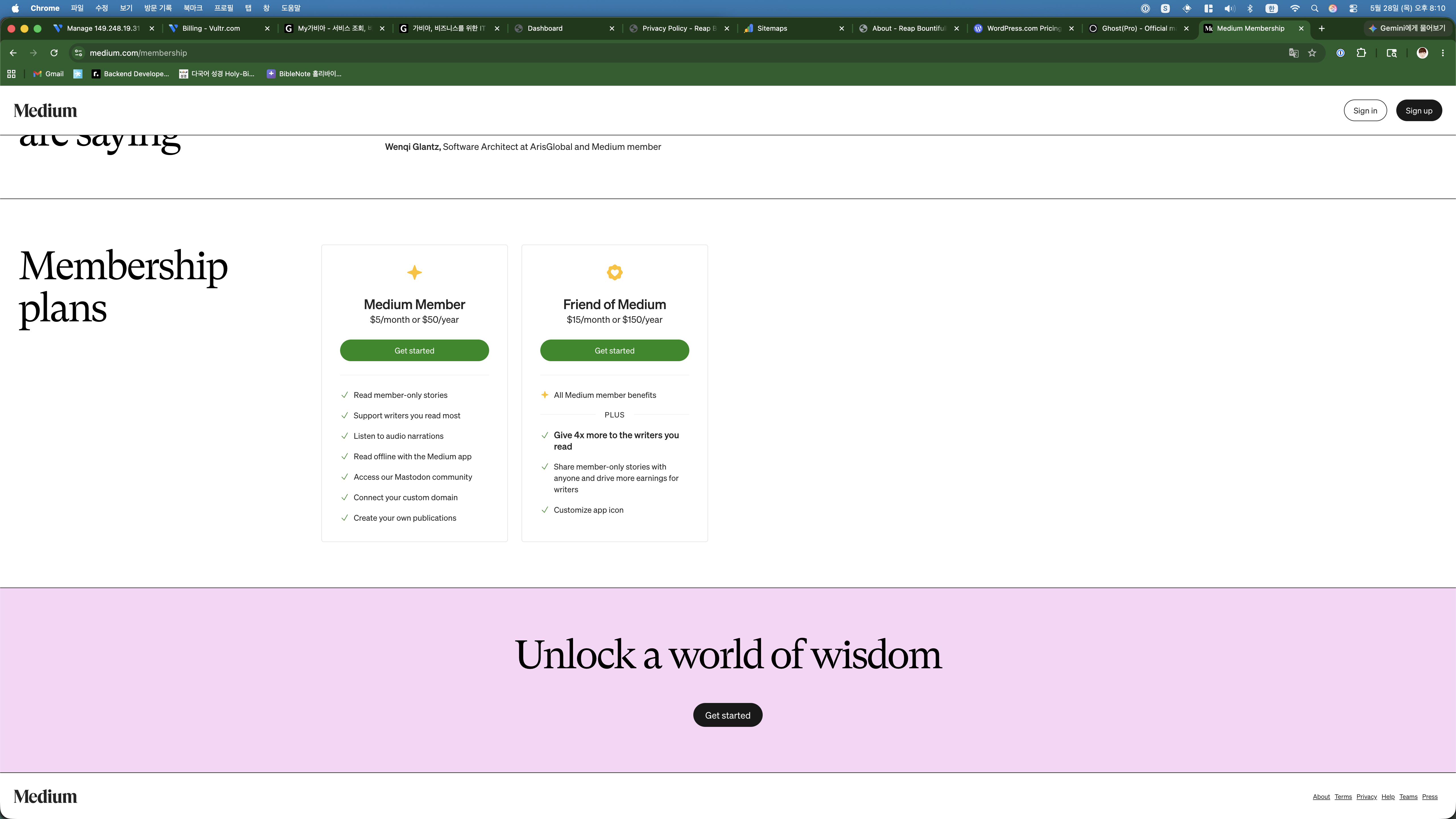
    Medium membership plans
    Medium’s membership page — $5/month or $50/year. But this is what readers pay, not writers.

    Claude explained that Medium is free for writers, but your content lives on medium.com. You do not get your own domain, you cannot run your own ads, and your SEO juice goes to Medium, not to you. The monetization is through their Partner Program, where you earn based on reading time from paying members.

    I asked: “So can I put AdSense on Medium?” Claude’s answer was a flat no. That was basically the end of Medium for me.

    Substack: Free But Wrong Tool
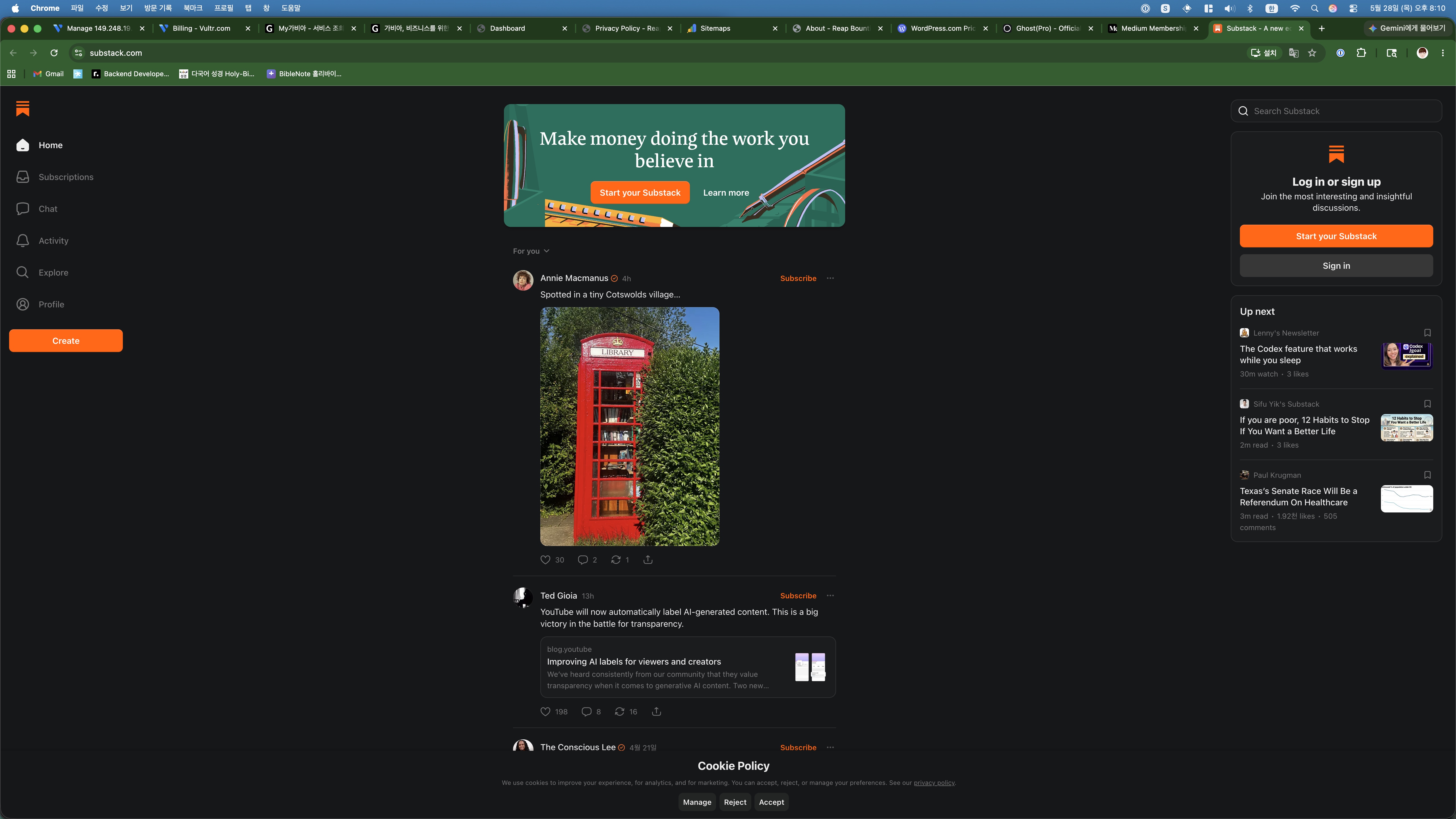
    Substack homepage
    Substack’s homepage. “Make money doing the work you believe in” — but only through paid newsletters.

    When I sent the Substack screenshot, Claude pointed out something I had not considered: Substack is designed for newsletters, not SEO-driven blogs. It takes 10% of your paid subscriber revenue, which is fair for what it does. But there is no ad support, minimal customization, and the discovery features favor established writers.

    I asked Claude if Substack posts rank well on Google. The answer: not really. The posts live on substack.com, and you are competing with every other Substack writer for domain authority. For someone starting from zero who wants Google search traffic, that is a problem.

    Ghost: Claude’s Second Choice
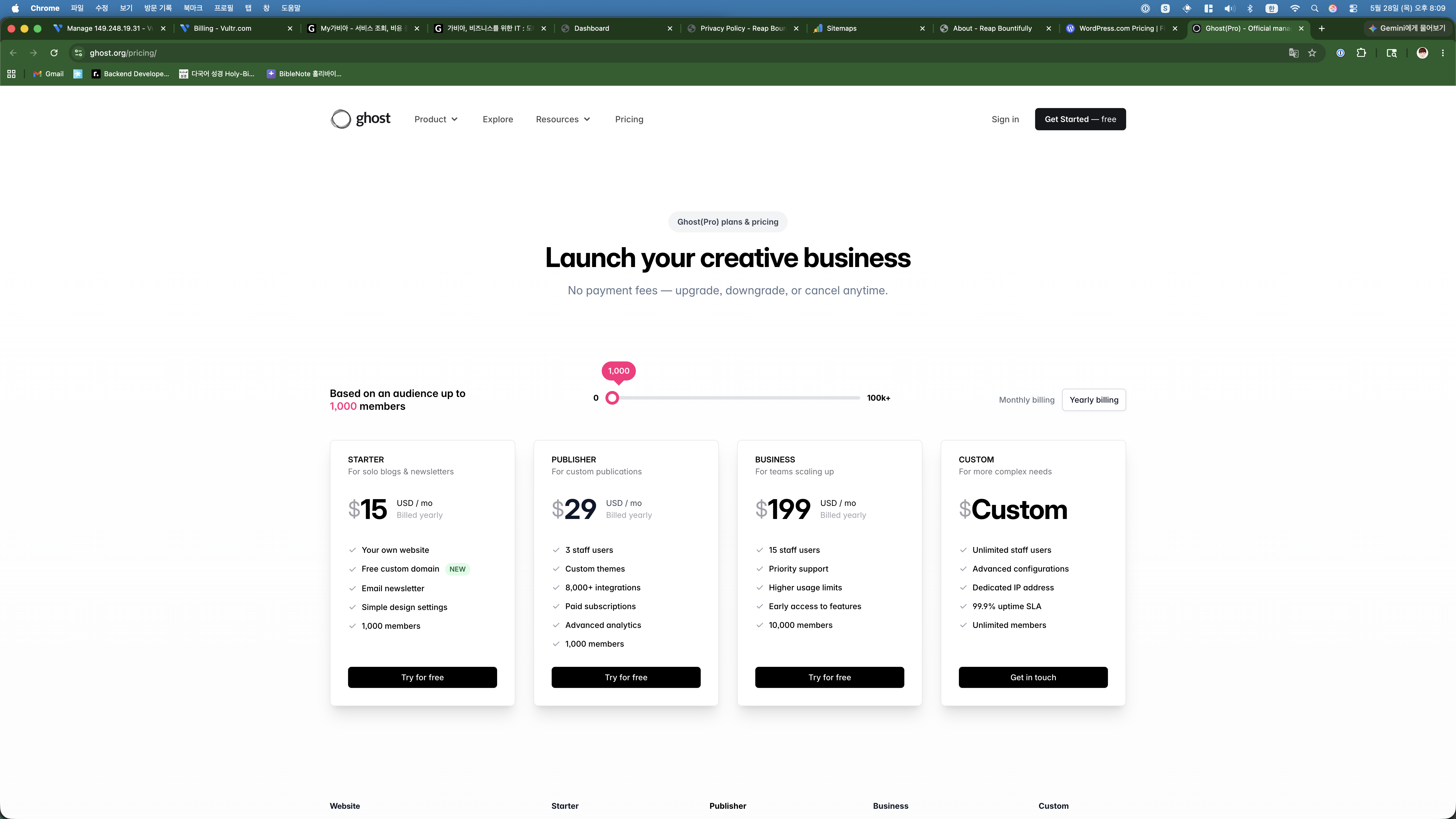
    Ghost pricing starting at $15/month
    Ghost Pro starts at $15/month. Beautiful platform, but that price adds up.

    Claude actually had good things to say about Ghost. Open source, fast, clean design, full SEO control with your own domain. It said Ghost was the second-best option after self-hosted WordPress.

    But when I sent the pricing screenshot, the numbers told the story. The starter plan is $15/month. For custom themes and better analytics, it is $29/month. I asked Claude: “Can I self-host Ghost instead?” It said yes, but Ghost needs more server resources than WordPress — on my $6 VPS it would be tight.

    I also asked about AdSense on Ghost. Claude said it is technically possible by injecting custom code, but it is not a native feature and there are fewer plugins to help. That was the deciding factor.

    WordPress.com: The Confusing One
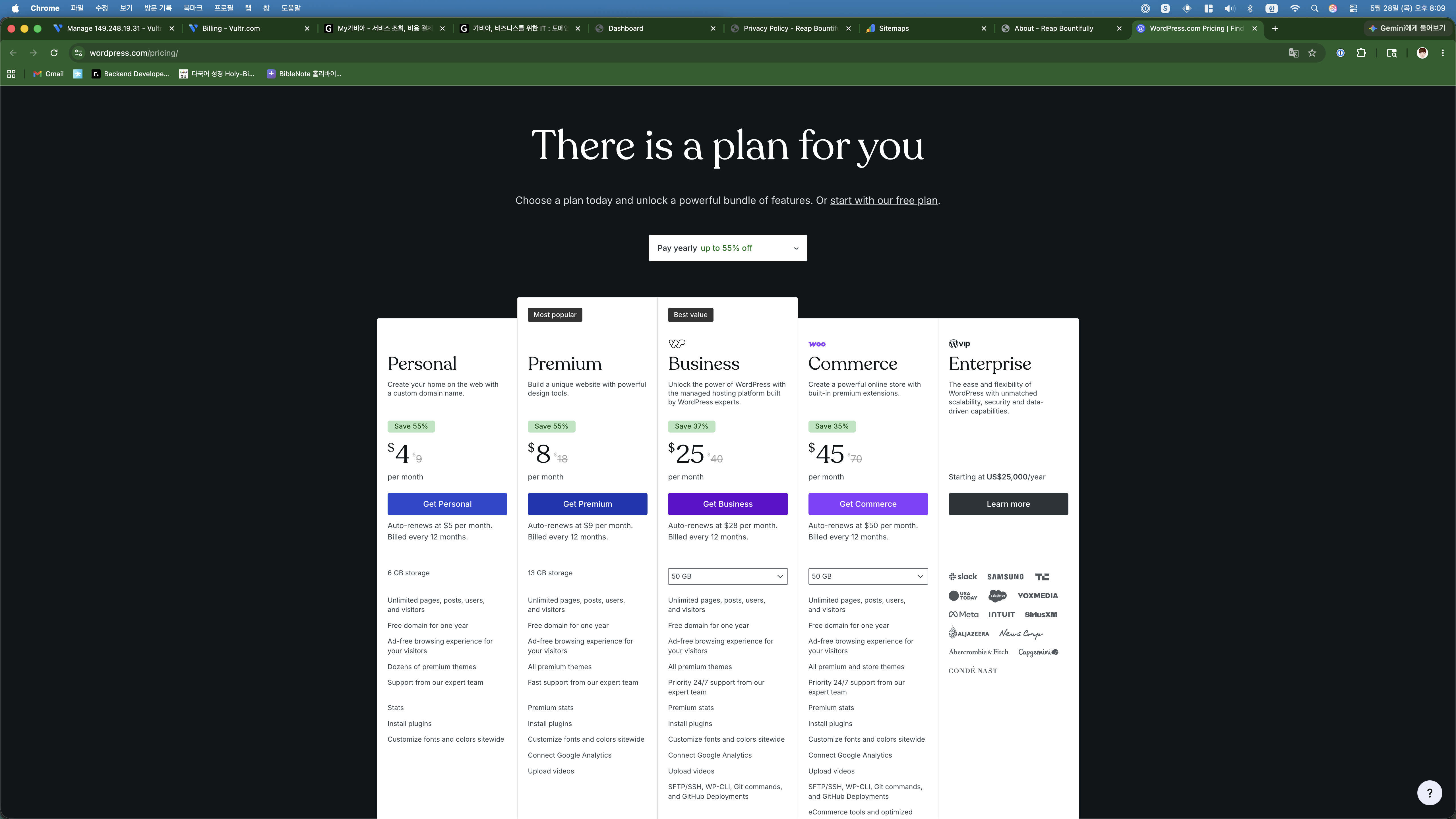
    WordPress.com pricing plans
    WordPress.com pricing — looks affordable at $4/month until you see what is actually included.

    This is where Claude saved me from a mistake. I almost signed up for WordPress.com’s Personal plan at $4/month thinking it was a good deal. Claude stopped me and explained that WordPress.com and WordPress.org are completely different things.

    WordPress.com is a hosted service. At the $4/month tier, you cannot install plugins, you cannot run your own ads, and customization is limited. To get plugin support and AdSense capability, you need the Business plan at $25/month.

    I said something like: “$25/month for something I can do on a $6 VPS?” Claude agreed — that was exactly its point.

    The Decision: Self-Hosted WordPress

    After going through all of this with Claude, the choice was obvious. Self-hosted WordPress on a $6/month VPS gives me everything I need:

    • Full ownership — my domain, my server, my content
    • AdSense ready — paste the code wherever I want
    • Full SEO control — Yoast SEO, custom permalinks, sitemaps
    • Massive plugin ecosystem
    • Total cost: $6/month + ~$10/year for the domain

    The only downside is the setup complexity. But as I documented in my previous post, Claude handled the entire server setup. So that downside basically does not exist anymore.

    The Comparison (For Quick Reference)

    FeatureMediumSubstackGhost ProWP.com BizSelf-Hosted WP
    Monthly costFreeFree$15+$25$6
    Custom domainNoPaid onlyYesYesYes
    AdSense supportNoNoHackyYesYes
    Full SEO controlNoNoYesYesYes
    Plugin ecosystemNoneNoneSmallLargeMassive
    Setup difficultyEasyEasyEasyEasyAI did it for me

    How This Post Was Made

    Quick behind-the-scenes on this one: I told Claude I wanted to write a platform comparison post. Claude started by researching pricing information from each platform’s website, but some of the data was incomplete. So it asked me to visit each pricing page and take screenshots. I opened WordPress.com, Ghost, Medium, and Substack in my browser, captured the pricing sections, and sent them back.

    Claude then wrote the first draft. I told it I wanted the article to feel like a real conversation — showing how I actually went back and forth with the AI to make the decision, not just presenting a polished comparison table. So it restructured the whole thing around our actual discussion.

    Two iterations to get here. The screenshots are mine, the research was a team effort, and the English writing is Claude’s.

    Oh, and one more thing: I did not copy this article into WordPress and hit publish. Claude did that too. It connected to the server, created the post with all the images and formatting, and set it to publish on a schedule. I asked Claude whether I should post daily or every other day, and it recommended daily at 9 AM Los Angeles time for maximum US traffic. So this post was scheduled to go live automatically — I just had a conversation and approved the plan.

    The entire pipeline from idea to published post happens inside a single chat conversation. I talk, the AI builds.


    This post was written with Claude AI. I provided the direction, topic, and screenshots in Korean — Claude turned it into the article you just read.
  • How I Built a WordPress Blog in 30 Minutes Using AI (Step by Step)

    I have been putting off starting a blog for months. Today I finally opened Claude (an AI assistant) and typed: “If I give you Linux server credentials, can you install WordPress on it?”

    Claude said yes. And that kicked off a 30-minute conversation where I basically just followed instructions, took screenshots, and asked “what next?” over and over. The result is the blog you are reading right now.

    Let me show you exactly how that conversation went.

    Me: “Where should I buy a server?”

    I started by asking Claude where to get a cheap server for a blog. It recommended a few options — Vultr, DigitalOcean, Hetzner — and said Vultr was a good balance of price and performance, with a data center in Los Angeles that would work well for English-speaking traffic.

    I mentioned that I wanted to target international readers, not just Korean ones. Claude immediately adjusted its recommendation: skip the Seoul server, go with LA instead. It also said the $6/month plan (1 vCPU, 1GB RAM) would be more than enough for a blog.

    So I logged into Vultr and saw this:

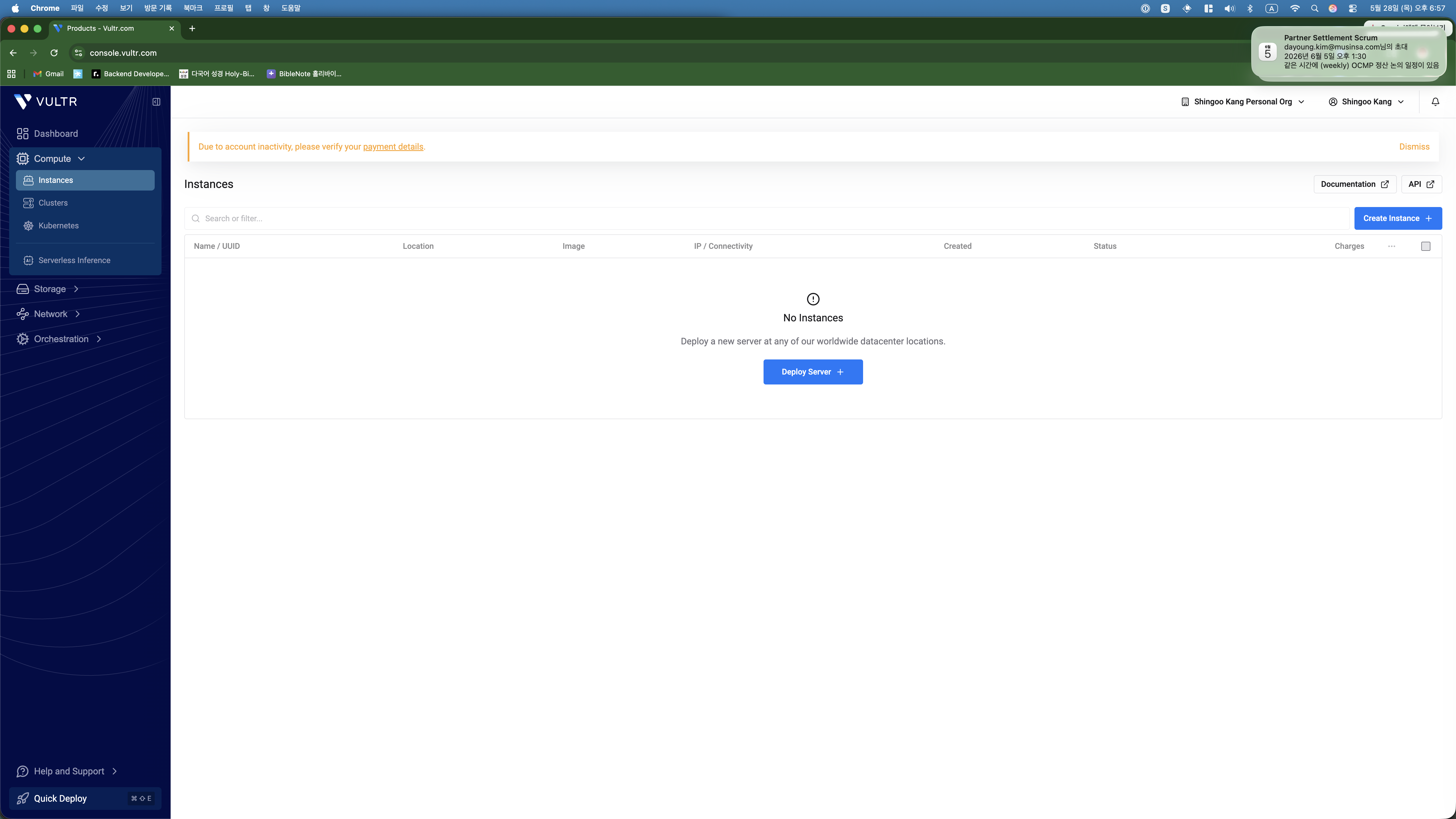
    Vultr empty dashboard
    Empty dashboard. No idea where to start.

    Me: *sends screenshot* “Now what?”

    This became the pattern for the entire setup. I would see a screen I was unsure about, take a screenshot, send it to Claude, and get step-by-step instructions back.

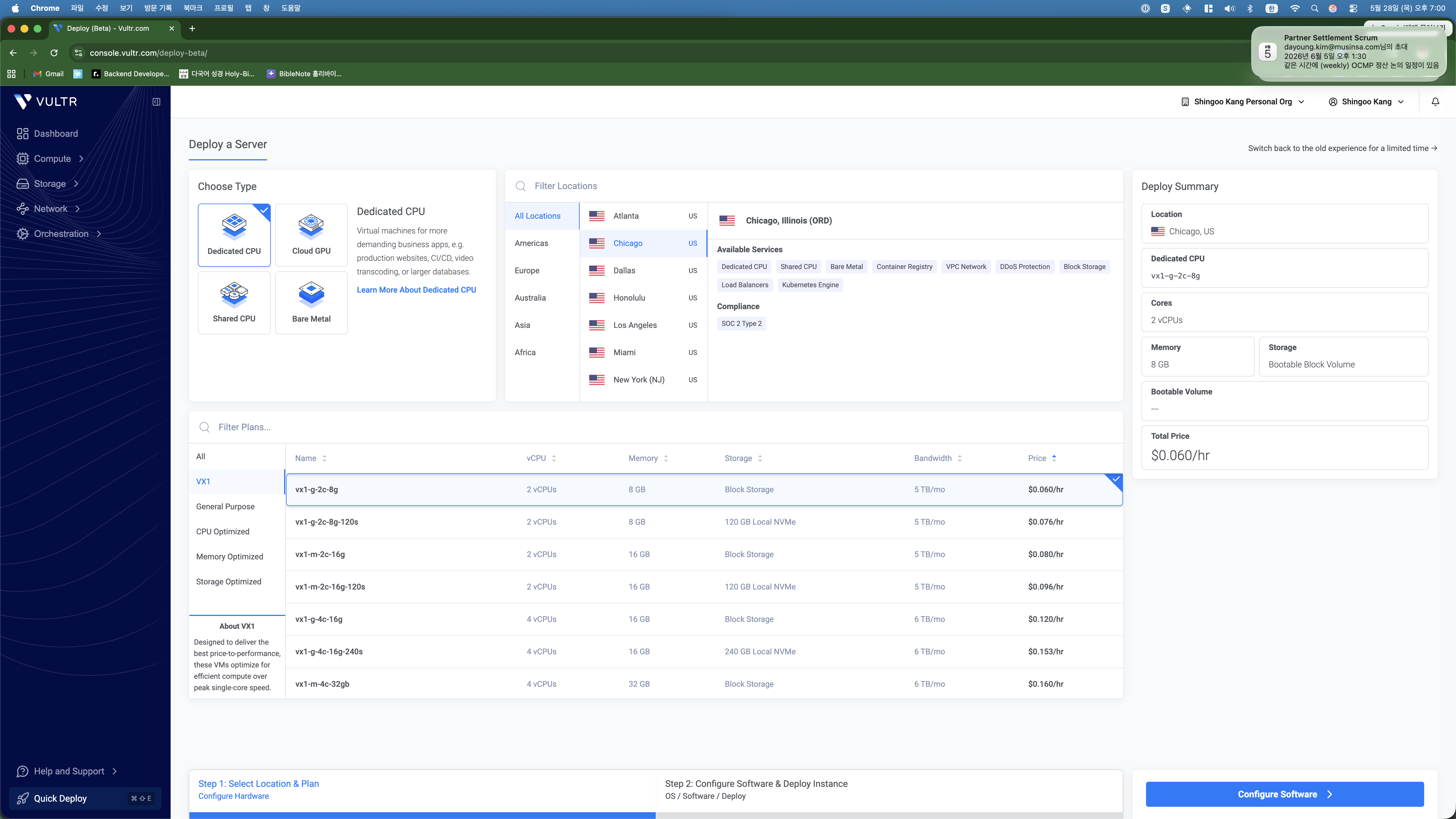
    When I clicked “Deploy Server,” I got hit with a wall of options. Dedicated CPU, Cloud GPU, Shared CPU, Bare Metal… I had no idea which one was right for a simple blog. So I screenshotted it and asked.

    Vultr deploy page showing Dedicated CPU selected
    I had Dedicated CPU selected. Claude told me that was overkill — “like renting a truck to carry a backpack.”

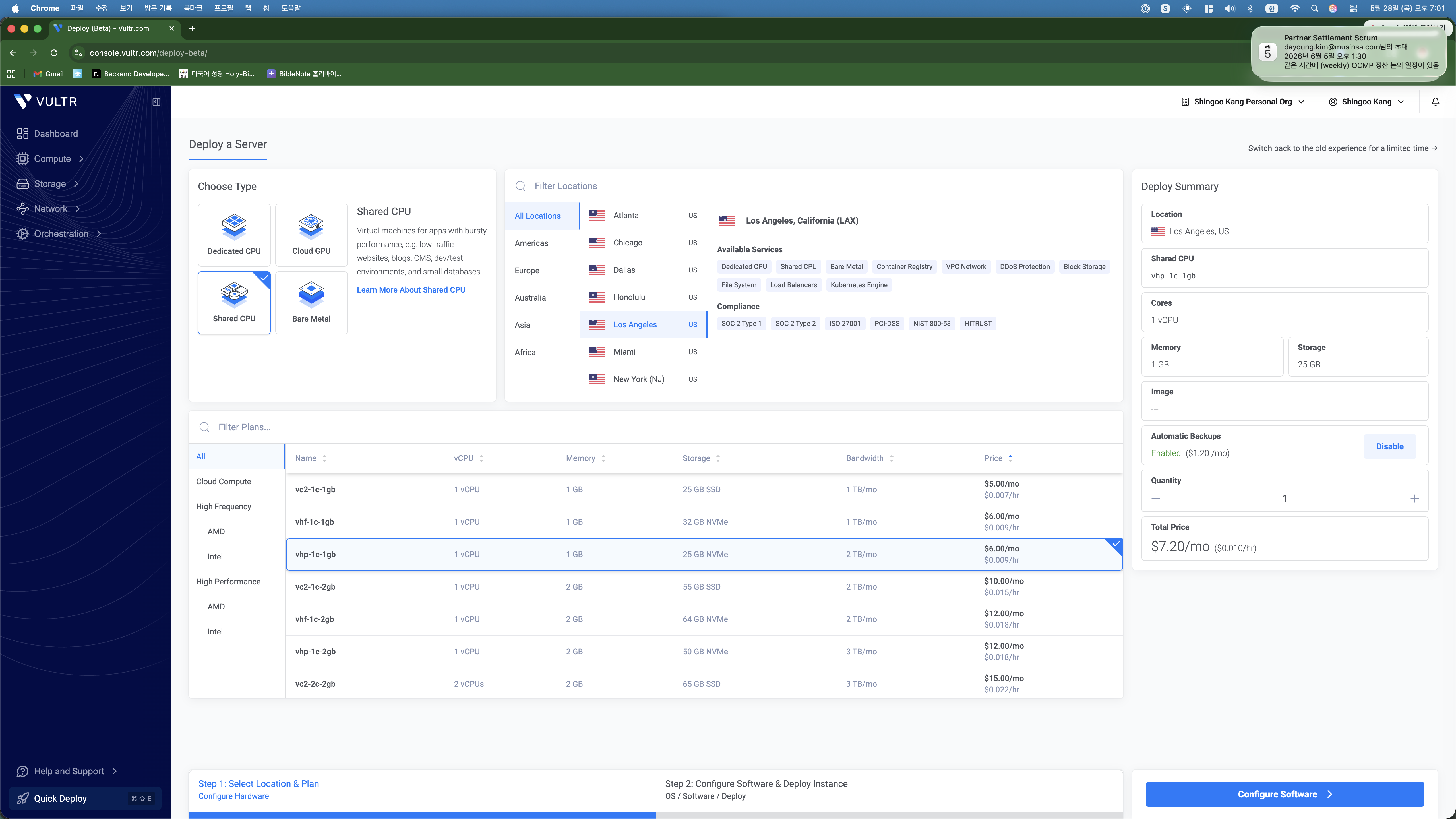
    Claude told me three things to change: switch to Shared CPU, pick Los Angeles, and choose the $6/month plan. I did exactly that and sent another screenshot to confirm.

    Vultr deploy with Shared CPU and LA selected
    Claude also spotted the automatic backup charge ($1.20/month) and told me to disable it.

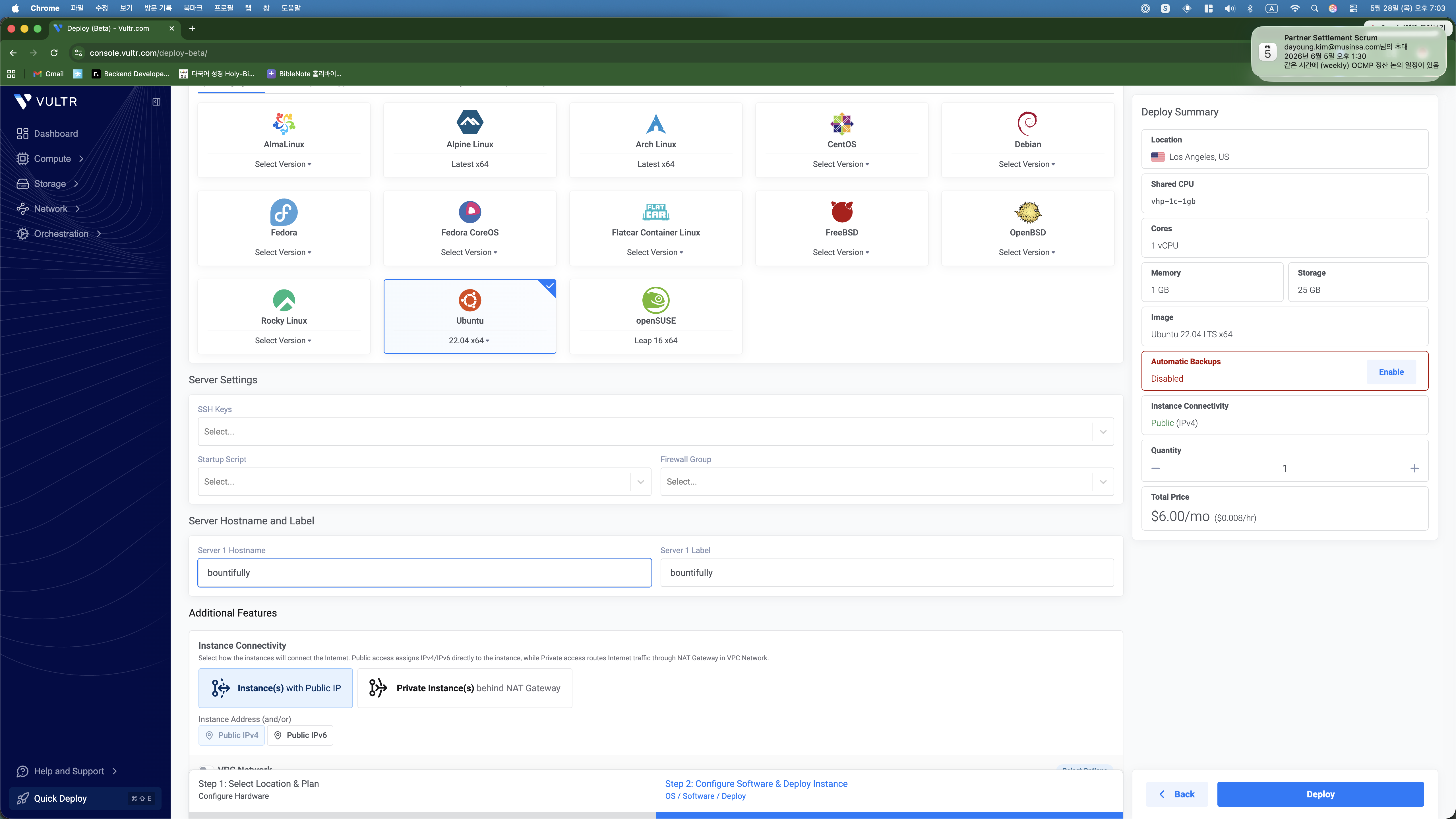
    Next screen: OS selection. Another screenshot, another quick answer from Claude — “Ubuntu 22.04, name it whatever you want, hit Deploy.” Done.

    Ubuntu 22.04 selected with hostname bountifully
    Named it “bountifully.” Not my most creative moment.

    Me: “Here is the IP and password. Install WordPress.”

    Two minutes later the server was running. I copied the IP address and root password from the Vultr dashboard and pasted them into the chat with Claude.

    And then Claude just… did everything. It connected to the server via SSH and started running commands. I watched it update system packages, install Nginx, install PHP 8.1 with all the WordPress extensions, install MariaDB, create a database, download WordPress, write the configuration files, and set up the Nginx virtual host.

    I also told Claude I had bought a domain (reapbountifully.com) on Gabia (a Korean domain registrar). Claude walked me through the DNS setup — I sent a screenshot of the Gabia DNS management page, and it told me exactly which A records to add and what values to put in.

    Then it set up SSL with Let’s Encrypt. The first attempt actually failed because the firewall was blocking ports 80 and 443. But Claude figured that out on its own, opened the ports, and retried. SSL certificate issued, HTTPS working, auto-renewal configured. All without me touching a single command.

    The 500 Error (and How Claude Fixed It in 30 Seconds)

    When I first opened reapbountifully.com in my browser, I got a 500 error. The site was broken before it even started.

    I did what I had been doing the whole time — took a screenshot and sent it to Claude. It checked the error logs, found that the wp-config.php file had some escaped characters causing a PHP syntax error, regenerated the file cleanly, and restarted the services. The whole fix took about 30 seconds.

    That is the thing about this workflow. Problems are not stressful because you do not have to solve them yourself. You just report what you see and let the AI handle it.

    It Works!

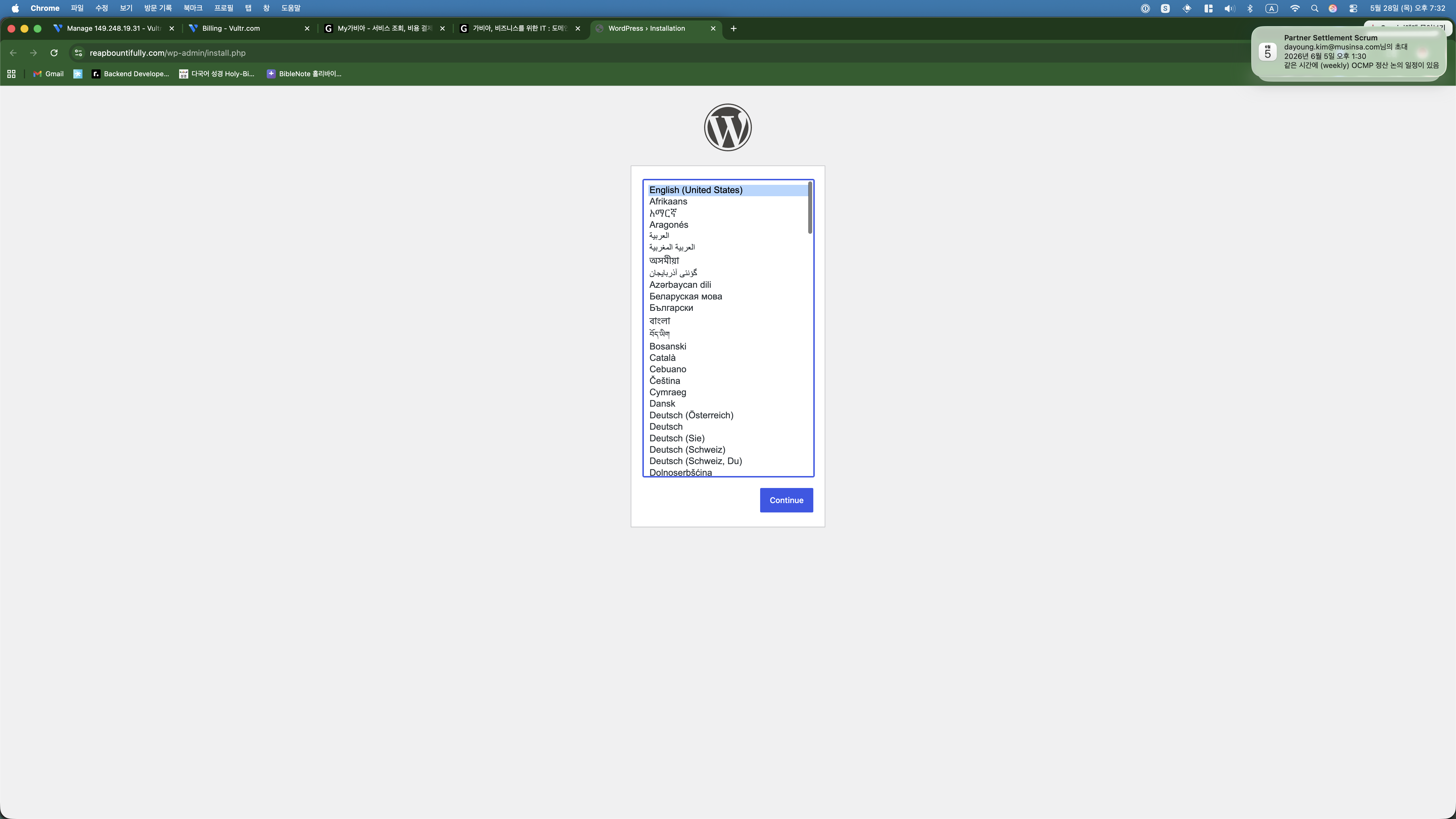
    After the fix, I refreshed the page and saw this:

    WordPress language selection screen
    The WordPress installation screen. It is actually alive.

    I was about to pick Korean, but Claude suggested English since the blog targets English-speaking readers. It mentioned I could switch the admin dashboard to Korean later for my own convenience. Smart.

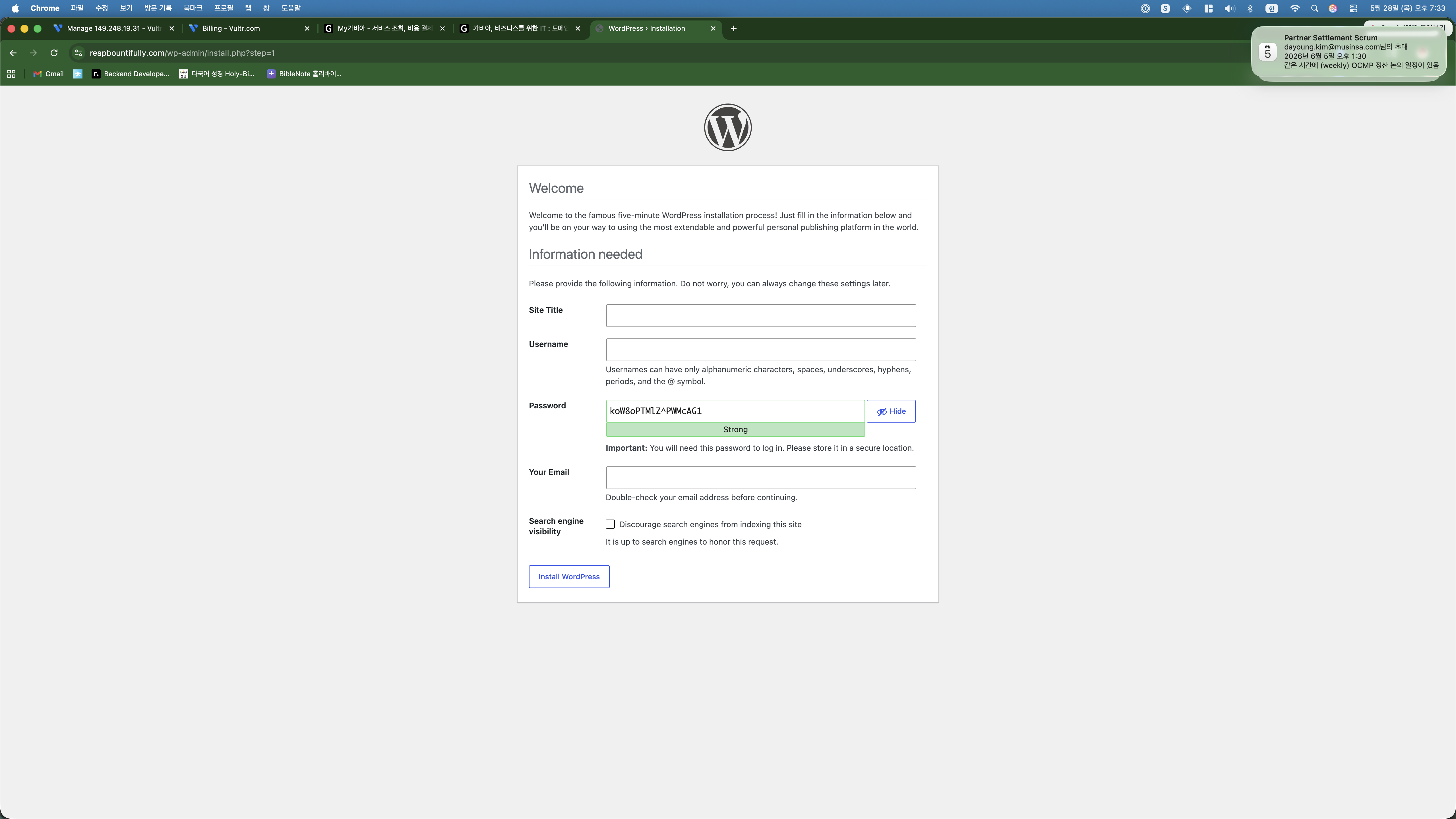
    WordPress installation form
    Site title, username, password. The auto-generated password is strong but impossible to remember.

    Clicked install and I was in.

    WordPress dashboard
    Dashboard. The blog exists.

    Me: “I want to make money with AdSense eventually.”

    When I told Claude my end goal was Google AdSense, it immediately shifted gears and started doing things I would not have thought of:

    It installed Yoast SEO and then walked me through the entire setup wizard — I sent a screenshot at every step and Claude told me what to select. It installed a caching plugin for performance. It changed the URL structure to be SEO-friendly. It created About, Contact, Privacy Policy, and Disclaimer pages (apparently Google rejects AdSense without these). It connected Google Search Console. It deleted the default “Hello World” post.

    All of this happened the same way: Claude tells me what is needed, does the server-side stuff automatically, and when there is something only I can do (like the Google Search Console verification), it gives me step-by-step instructions while I send screenshots for confirmation.

    And Yes — This Post Was Also Made with AI

    Here is the thing I want to be completely transparent about: this blog post was written by Claude too. And not just written — published.

    After the setup was done, I told Claude I wanted to write about the process. I said the key points in Korean — the overall story, what to emphasize, which screenshots to include, which ones to exclude (anything showing server passwords). Claude wrote the first draft in English.

    I read it and said it felt too stiff, too “AI-written.” Claude rewrote it with a more natural, conversational tone. I then said I wanted the article to show the back-and-forth process between me and the AI, not just the end result. Claude restructured the entire piece around our actual conversation flow.

    That is three iterations to get to what you are reading now. The AI writes, I direct. The AI suggests, I decide. It is a collaboration, and I think the result is better than what either of us would produce alone.

    And here is the part that really gets me: I never even copied and pasted this article into WordPress. Claude has SSH access to the server. When the draft was ready, it ran a command to create the post directly in the WordPress database. The screenshots? Claude uploaded those to the server and registered them in the media library. The SEO-friendly URL, the formatting, the image captions — all handled server-side by the AI.

    My literal workflow for publishing a blog post is: have a conversation in Korean, give feedback on drafts, and say “publish it.” That is it. I do not touch the WordPress editor. I do not copy-paste anything. The AI goes from draft to live post in one step.

    Why am I telling you all this? Because there are millions of AI-generated articles online pretending to be human-written. I would rather be upfront about it. This entire blog — the server, the configuration, the content, the publishing — is a vibe coding project. And I think showing the process honestly is more interesting than hiding it.

    What This Cost

    ItemCost
    Vultr VPS$6/month
    Domain name~$10/year
    SSL CertificateFree
    WordPress + PluginsFree
    My actual effortTaking screenshots, giving directions in Korean

    What is Next

    1. Write 15-20 posts about my side hustle experiments with vibe coding
    2. Apply for Google AdSense once there is enough content
    3. Document everything — real numbers, real failures, real process

    Day 1, done. Let us see where this goes.


    This post was written with Claude AI. I provided the direction, topic, and screenshots in Korean — Claude turned it into the article you just read.