This is Part 4 of my “Running a Blog from Telegram” series. Quick recap: Part 1 built the bot and published the first post. Part 2 added draft review, feedback loops, and scheduling buttons after a feedback disaster nearly broke everything. Part 3 introduced the /trending command — Google Trends analysis that suggests blog topics based on what people are searching for.
By the end of Part 3, I felt like the system was complete. The bot could suggest topics, write drafts, accept feedback, and schedule posts. What more could I need?
Turns out, quite a lot. The /trending command had a fundamental problem I didn’t see coming.
The Problem with /trending: You’re Already Too Late
Here’s what I realized after using /trending for a week. When a keyword is #1 on Google Trends — say “rafael nadal” or “save act senate” — it means millions of people are already searching for it. Sounds great, right? More searchers = more potential traffic?
Not for a blog with 5 visitors a day.
By the time a keyword hits Google Trends, CNN has already published. TechCrunch has already published. The Verge, Reuters, BBC — they’ve all published. These sites have domain authority scores in the 90s. My blog has… optimism.
When I write a post targeting a trending keyword, Google looks at my site and essentially says: “Cute. Here’s page 47 of the search results.” Nobody scrolls to page 47. Nobody even scrolls to page 2.
The /trending command was giving me topics that were already too competitive by the time I saw them. It’s like showing up to a party after everyone’s already gone home.
The Window Nobody Talks About
But here’s what I noticed: there’s a gap. A small window between when news breaks and when everyone starts searching for it.
Think about it. A tech company announces a new AI feature. The news sites report it immediately. But the searches — “how to use [new feature],” “is [new feature] worth it,” “[new feature] vs [competitor]” — those come later. Sometimes hours later. Sometimes a day or two later. That’s because people need to hear about something, think about it, talk about it with friends, and then go to Google.
That window — between “news breaks” and “everyone searches for it” — is where a small blog can actually win. The big sites have published their news articles, but they haven’t written the SEO-optimized guides, explainers, and comparison posts yet. That’s our territory.
I needed a command that scanned the news, not the search trends. Something that found topics before they became trending keywords.
Building /discover: The Keyword Radar
So I built /discover — and the concept is fundamentally different from /trending.
Instead of looking at what people are searching for (too late), /discover scans what people are talking about (just right). It pulls from actual tech news RSS feeds:
- TechCrunch
- The Verge
- Hacker News (only stories with 100+ points, to filter out noise)
- Ars Technica
- Wired
The bot grabs the latest headlines from all these sources. Then Claude analyzes them — not just summarizing, but evaluating each one as a blogging opportunity. For each suggestion, Claude considers:
- Is this NEW? Just emerging, not yet saturated?
- Is it RELEVANT? Connected to my blog’s niche (AI, dev tools, side hustles, blogging)?
- Is competition LOW? Have the big sites written SEO-optimized guides yet, or just news articles?
- Is it SEARCHABLE? Will people actually Google this in the next few days?
Each suggestion comes with an SEO-optimized title, a long-tail keyword (3-5 words for realistic ranking), an explanation of why this is a good opportunity right now (written in Korean, so I actually understand the strategy), and an urgency level:
- 🔴 Write today — the window is closing fast
- 🟡 Write this week — good opportunity, not urgent
- 🟢 Write anytime — evergreen angle on a current topic
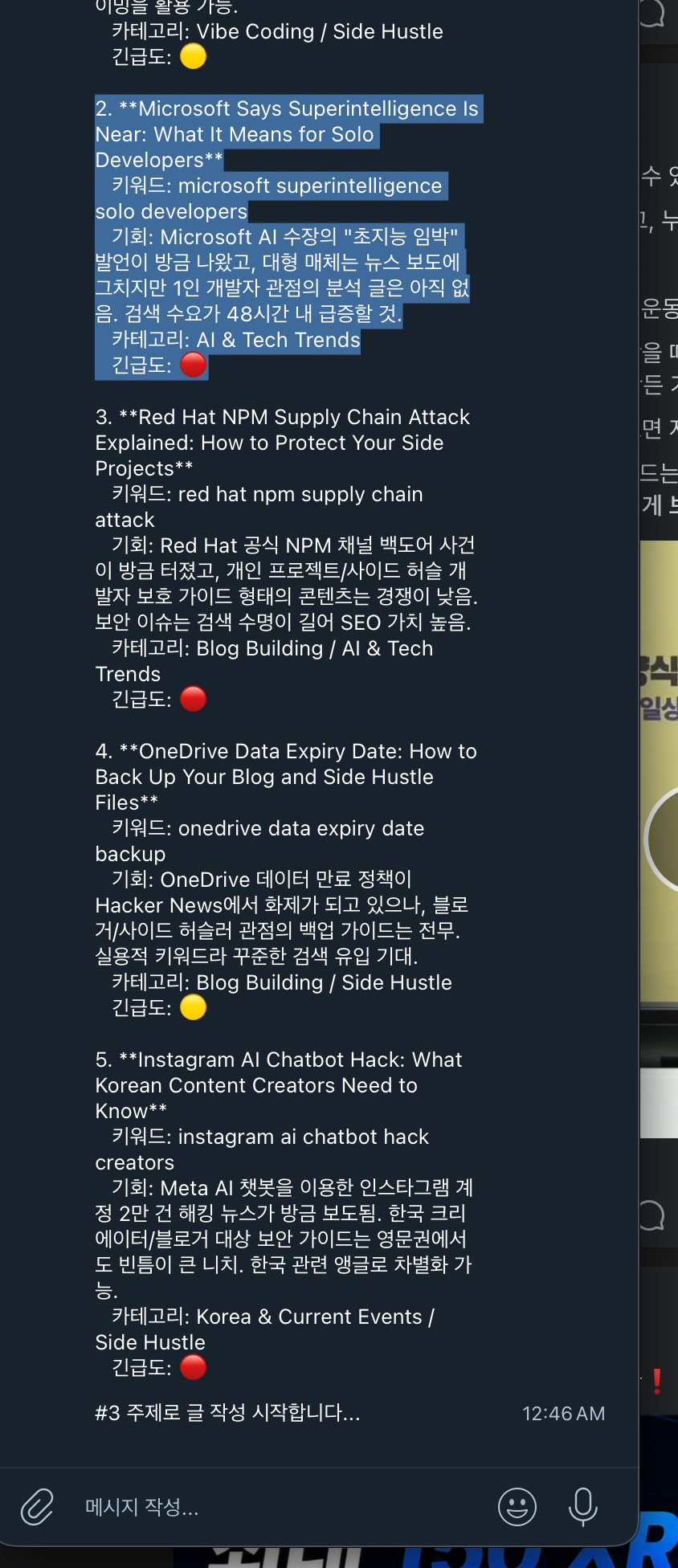
The difference between /trending and /discover is like the difference between watching the evening news and reading the wire reports. By the evening news, everyone knows. The wire reports give you a head start.
The “What Is That?” Problem
So /discover worked. It found real opportunities. But it created a new problem I didn’t expect.
The bot would suggest something like: “Red Hat NPM Supply Chain Attack — Explained for Side Project Developers.” And I’d stare at it and think: “…what is that?”
I’m a Korean developer who builds side projects. I’m not a security researcher. I don’t follow npm vulnerability reports for fun. The bot found a genuinely good topic — something developers would search for, with low competition — but I had no idea what actually happened or why I should care.
And here’s the thing: I could still write the post. Claude can write about anything. But without understanding the topic myself, how could I add my own perspective? How could the post be anything more than a rewritten news article? That’s not what this blog is about.
I needed the bot to educate me before asking me to write.
The Briefing Flow
So I added a step between “select a topic” and “start writing.” When I tap a topic number, instead of immediately generating a draft, the bot now shows a briefing — entirely in Korean:
- 무슨 일이 있었나? (What happened?) — A clear, simple summary of the event or announcement.
- 왜 중요한가? (Why does it matter?) — Why this matters to developers or the tech community.
- 블로그 글 앵글 (Blog angle) — How this blog specifically should approach the topic.
- 독자 타겟 (Target reader) — Who would read this and what they’re looking for.
This changed everything. After reading the briefing, the npm supply chain attack wasn’t some mysterious security thing anymore — it was a story about how a trusted package registry got compromised, and how any developer running npm install could have been affected. Suddenly I had opinions. Suddenly I could relate it to my own experience installing packages for this very blog.
After the briefing, I get two options:
- Send a message with my opinion — I type something like “I run npm install without thinking about it every day, this is terrifying” and the bot weaves that perspective into the post naturally.
- Tap “✍️ 이대로 글 작성” (Write as-is) — If the briefing is enough and I don’t have strong opinions, the bot writes without additional input.
The result? Even when writing about topics I didn’t know about five minutes ago, the posts have genuine personal perspective. Not fake “as a developer, I think…” filler. Real reactions to real information I just learned. The briefing makes that possible.
Scheduling Got Smarter Too
While I was upgrading the topic discovery, I also fixed something that had been bugging me about scheduling.
In the old system (Part 2), there was one scheduling button: 📅 예약 발행 (Schedule publish). It would add the post to the end of the publishing queue. Simple.
But /discover changed things. When the bot says a topic is 🔴 urgent — “write today, the window is closing” — putting it at the end of a queue with 6 posts ahead of it defeats the purpose. By the time it publishes three days later, the window is gone.
So now there are two scheduling options:
- 📅 다음 예약 (밀어넣기) — Insert at the NEXT available time slot, pushing all other scheduled posts back by one slot. This is for 🔴 urgent topics where timing matters.
- 📅 맨 뒤 예약 — Add to the end of the queue, after everything else. This is for 🟢 evergreen topics or 🟡 topics with a comfortable window.
It’s a small change, but it means I can react to breaking news without manually rearranging my entire publishing schedule. The bot handles the reshuffling.
The Evolution: Four Parts of Growing Up
Looking back at this series, there’s a clear progression in what the bot does — and what I do:
- Part 1: Message → Post. I come up with the idea, the bot writes it. Basic automation.
- Part 2: Message → Draft → Feedback → Publish. I control quality. The bot is an editor I can argue with.
- Part 3: Trending → Suggest → Write. The bot suggests ideas based on search data. Content strategy enters the picture.
- Part 4: News scan → Discover opportunities → Briefing → Add opinion → Write. The bot finds emerging keywords, educates me on topics, and I add genuine perspective. SEO strategy meets personal voice.
The interesting pattern: with each upgrade, I do less mechanical work but more creative work. In Part 1, I had to come up with everything — the topic, the angle, the structure. Now the bot handles all of that. But I’m more involved than ever because the briefing system means I’m actually thinking about each topic, forming opinions, and contributing perspectives that Claude can’t generate on its own.
That feels like the right division of labor. The bot handles research, analysis, and writing mechanics. I handle the human part — the “here’s what I actually think about this” that makes a blog post worth reading instead of just another AI-generated summary.
Does It Actually Work for SEO?
Honestly? It’s too early to tell with confidence. The /discover command has only been running for a few days. But the logic is sound: targeting long-tail keywords (3-5 words) with low competition gives a small blog a realistic shot at ranking. And catching topics early — before the SEO-optimized guides flood in — gives us a first-mover advantage that domain authority alone can’t override.
The npm supply chain attack post, which was one of the first /discover suggestions I acted on, is already indexed. Whether it ranks well enough to drive meaningful traffic… ask me in Part 5.
What I can say is this: the process feels right. Instead of guessing what to write or chasing keywords that are already dominated by big players, I’m making strategic bets on emerging topics. Some will pay off. Some won’t. But the strategy is fundamentally different from throwing content at the wall and hoping something sticks.
What’s Next?
The bot keeps getting smarter, and I keep finding things to fix. Some ideas rattling around:
- Tracking which /discover topics I’ve already covered (so it doesn’t suggest the same angle twice)
- Monitoring which posts actually get search traffic, so the bot can learn what “works” for this specific blog
- Combining /trending and /discover — trending shows what’s hot NOW, discover shows what’s ABOUT to be hot. Together, they’d give a more complete picture.
But for now, the system does something that would have seemed absurd a month ago: I open Telegram, the bot scans the tech news, finds SEO opportunities, explains the topics to me in Korean, listens to my opinion, writes a post that sounds like me, and schedules it at the right time. All from my phone, all in a chat interface.
Sometimes I wonder if I’m the blogger or the bot is. Then I remember — the bot can’t have the “wait, what IS that?” moment. That confusion, followed by understanding, followed by a personal take? That’s the part only a human can do. Everything else is just logistics.