In Part 1, I showed how I built a Telegram bot that lets me publish blog posts from my phone. Send a topic in Korean, get a polished English article on my WordPress site. It felt magical.
That magic lasted exactly one post.
The Post That Exposed Everything
June 3rd was election day in South Korea, and there was a wild story — ballot shortages, paper running out at polling stations, the whole thing. Perfect blog material. I sent the topic to my bot, it wrote the article, and it published successfully. Great, right?
Well, sort of. The post went live under “Side Hustle” — because my bot only had three categories to choose from, and none of them fit “current events.” But that was a minor issue compared to what happened next.
The Feedback Disaster
At 2:18 PM, right after the election post was published, I sent the bot some feedback:
“어 글은 괜찮긴한데, 뉴스 기사에 있는 이미지도 활용하면 좋겠고, 국가 선거관리위원회가 아니고 중앙선거관리위원회이고, 그게 영어가 NEC가 맞아? 아닌거 같은데?”
Translation: “The post is fine, but it’d be nice to use images from the news articles. Also, it’s not 국가 선거관리위원회 (National Election Commission) but 중앙선거관리위원회 (Central Election Management Committee), and is the English abbreviation NEC correct? I don’t think it is.”
Three simple requests: add images, fix the organization name, verify the English abbreviation. Standard feedback. The kind of thing you’d tell any editor.
But my bot wasn’t an editor. My bot was a one-trick pony.
At 2:18 PM, the bot replied: “글 작성 시작합니다… 주제: [my entire feedback message]”
It treated my feedback as a brand new post topic. It was about to write an entirely separate article titled something like “Is NEC the Correct Abbreviation for Korea’s Election Commission?” My correction notes were becoming their own blog post.
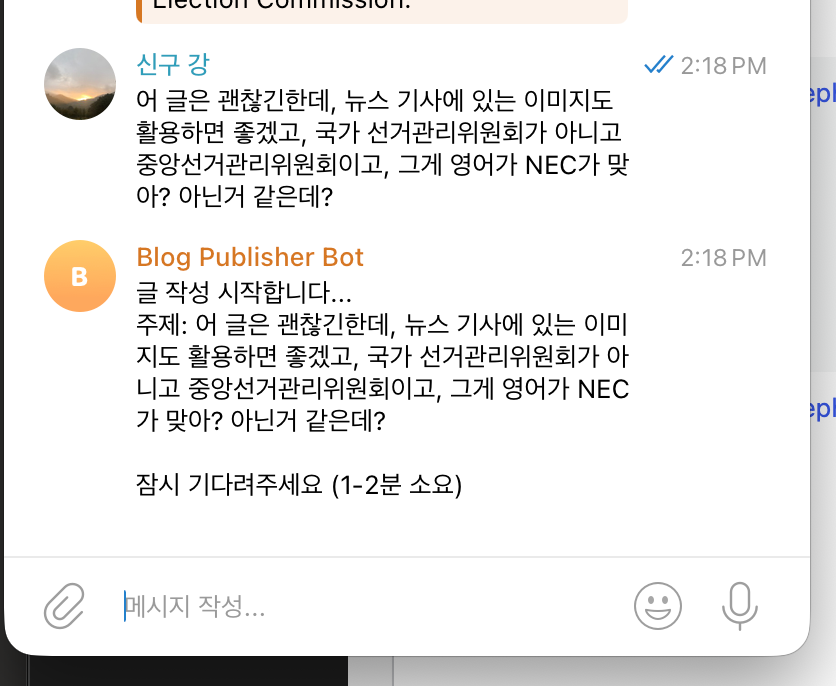
The fundamental problem was obvious: the bot had no memory. No concept of “the thing we were just talking about.” Every single message was a fresh start. A new topic. A new post. There was no conversation — just a series of disconnected commands.
The Accidental Save
Here’s where it gets funny. Despite the bot’s architecture being completely wrong, Claude (the AI behind it) was smart enough to figure out what I actually meant from context. At 2:21 PM, instead of creating a new post, it actually updated the existing election article.
The bot responded: “글이 업데이트되었습니다. 변경사항:” (Post has been updated. Changes:)
- 이미지 3장 추가 — Added 3 images (ballot box, protest crowd, Seoul cityscape) placed throughout the article
- 중앙선거관리위원회 표기 확인 — Confirmed the correct Korean name and that NEC is indeed the right English abbreviation
- 지플락 백/골판지 상자에 투표용지 배달 관련 내용 추가 — Added details about ballots being delivered in ziplock bags and cardboard boxes
- “How This Post Was Made” 섹션 업데이트 — Updated the meta section
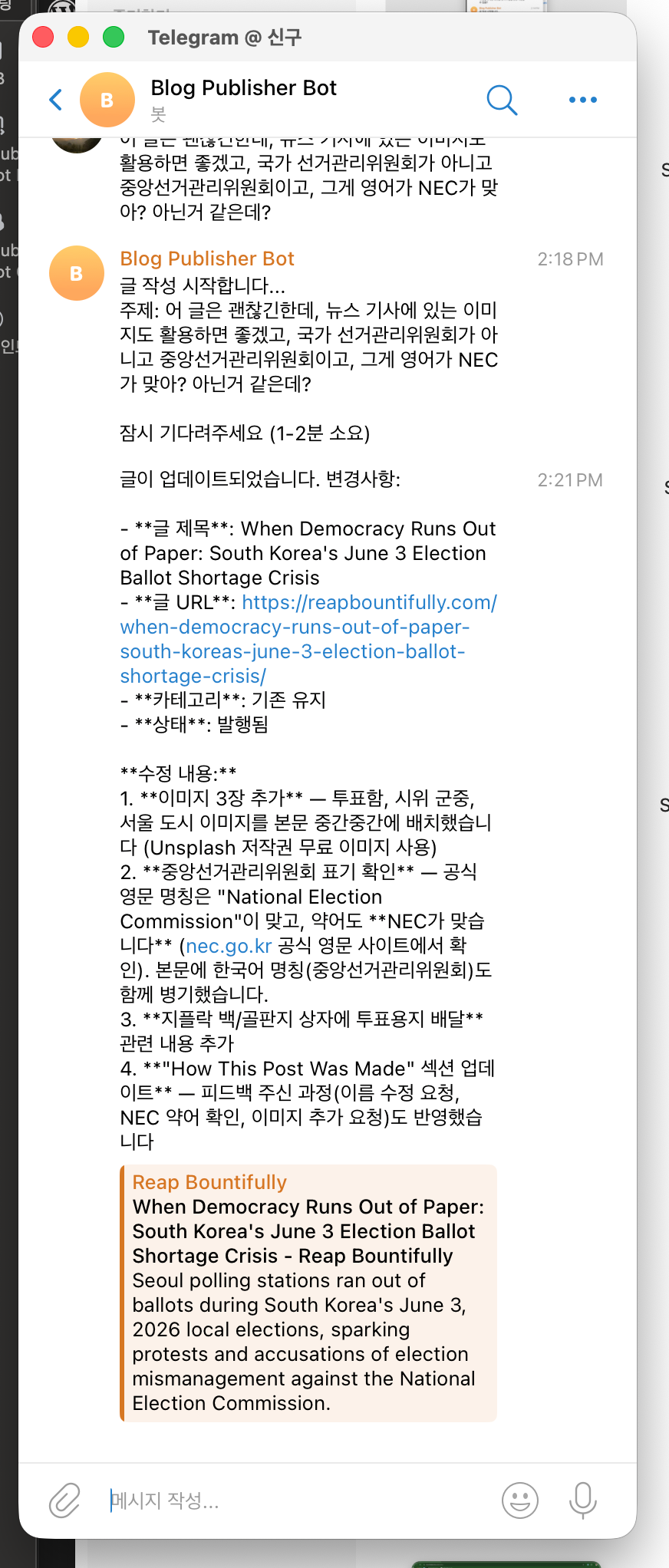
So it worked out. This time. But it was pure luck — the AI happened to infer my intent despite the system telling it to start a new post. The architecture was fundamentally broken. The next feedback message might not be so lucky.
Three Problems, One Root Cause
I went back to my Mac, opened Claude Code (the desktop version, not the Telegram bot), and laid out what went wrong. There were three distinct problems, but they all came from the same design flaw: the bot was stateless.
Problem 1: Every message = new post. There was no concept of a “current draft” or “the post we’re working on.” Each message was processed in isolation. Send feedback? New post. Send a correction? New post. Ask a question? Believe it or not — new post.
Problem 2: No publish control. The moment the bot finished writing, it published. No review step. No “hey, does this look right?” Just straight to the live site. For a personal blog, that’s terrifying. What if the AI hallucinates something? What if the title is terrible? You’d find out the same time your readers do.
Problem 3: Wrong categories. The election post went under “Side Hustle” because the bot only had three categories, and it picked the least-worst option. There was no way to override it before publishing, because — see Problem 2 — there was no review step.
What I Changed
The fix wasn’t about tweaking parameters or adjusting prompts. It was a fundamental redesign of how the bot works.
A state machine for conversations. The bot now tracks whether you’re starting something new or working on an existing draft. Send a topic? It writes a draft — but doesn’t publish. Send another message while a draft exists? That’s feedback. The bot revises instead of starting over. Want to abandon the whole thing? /cancel clears the slate.
This sounds simple, but it completely changes the dynamic. The bot now has a sense of “we’re in the middle of something.” It’s the difference between talking to someone with short-term memory loss and having an actual back-and-forth conversation.
Inline buttons for publishing. After the bot generates or revises a draft, three buttons appear right there in the Telegram chat:
- ✅ 바로 발행 (Publish Now) — goes live immediately
- 📅 예약 발행 (Schedule) — automatically queues it after the last scheduled post
- ❌ 취소 (Cancel) — discards the draft
The “Schedule” button is particularly nice. It checks when the last scheduled post is set to go live and slots the new one for the next available time. No mental math about what day it is or what’s already in the queue.
Better category handling. I added “AI & Tech Trends” as a fourth category — because let’s be honest, half the interesting stuff I want to write about is tech news. More importantly, the category suggestion is now part of the draft review. You see the suggested category before publishing, and you can change it with a tap.
The New Flow
Here’s what it looks like now, from my phone:
- I send a topic in Korean (or English, or a mix — doesn’t matter)
- The bot writes a full draft and shows me a preview with the suggested title, category, and excerpt
- If something’s off, I send feedback — “make the intro shorter,” “add more detail about X,” “wrong category, use Blog Building instead”
- The bot revises and shows me the updated version
- When I’m happy, I tap a button to publish or schedule
That’s it. Five steps instead of one, but each step is better. I actually read the post before it goes live. I can course-correct. I have control.
What I Learned
Building a tool is step one. Using it in the real world is step two, and step two always, always breaks step one.
My first version of the bot was built on assumptions: that I’d always send clear topics, that the AI would always pick the right category, that I’d never need to edit anything after the fact. Every single assumption was wrong within the first real use.
The ironic part? The fix took maybe 30 minutes with Claude Code. Explaining the problems was harder than solving them. “Here’s what happened, here are the screenshots, this is broken, this is broken, this is broken” — and Claude rebuilt the flow. State machine, inline buttons, scheduling logic, category selection. All of it.
That’s the vibe coding reality that nobody talks about: the first build is fun, the first use is humbling, and the first rebuild is where the tool actually becomes useful.